
Blog / October 2026
-
7 October 2026 Working on Dark Mode
I'm working on adding Dark Mode to the site. And then, while we're at it, it might be fun to add a theme switcher and have additional color themes just to changes things up.
No promises though! Hopefully I won't have to abandon this feature, but it's a lot of work. I asked Claude to identify all unique colors in the codebase and it found ~300+ colors. All these small variations of colors accumulated over the last 20 years in the codebase.
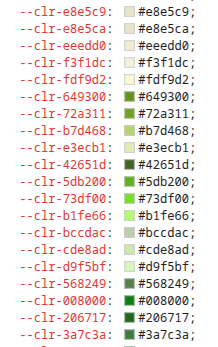
In theory I could ask Claude Code to merge it all into a small palette that is more manageable for writing themes, but it would probably do a bunch of things I don't want. So it's more of a gradual process.
For example today I asked Claude to identify all the green/lime colors in the unique colors list we made, and then merge them into a smaller lime scale of just 5 steps. It worked pretty well!
So I'm down to about 200 colors atm. A bunch of refactoring happens on the way, some dead code (unused php/css).
This is Phase 2. Phase 1 was identifying all the unique colors. Phase 3 is when I have a manageable palette of ~50 theme-able colors. I will then implement a theme switcher drop-down somewhere, or maybe put it in the Settings, with a live preview.
I will start with a Dark Mode theme which has been requested. Designing a good dark mode is not trivial, but we'll see. There's a bunch of places where you have "use this color but lighter" for the background, where I am guessing it will break in Dark Mode, where you'd want darker instead. So it will be more refactoring, in theory I might have to deduplicate some colors into their lighter/darker variants so I can fully theme them.
I'm working with the cheaper Claude Pro subscription which is ~ 20 EUR. I was using Claude Sonnet before but now I switched to Opus 5.5 which is more powerful and I am not running into the usage limits so that's good. Obviously here I am not "vibe coding" something where I let Claude run for 1h on some complex problem so that helps.
So yeah. Moving on with the times. I for one, welcome our AI overlords. I think it's amazing, at least for developers. I am still fascinated now and then by how the AI figures out things. People say "it just predicts the next word"... that is obviously a massive over simplification of what is going on. And with multi-modal input it's just nuts.
So I'm trying to do more complex things gradually with AI. Learning curve. I thought it was pretty neat Claude used "headless chrome" basically to screenshot a page before/after and evaluate if the merged colors did not move too much visually. Whoah. I didn't even now I could run "headless chrome" on the command line.
Somehow this reminded me of Beastie Boys - Intergalactic. :P
PS: if you have any requests / comments related to Dark Mode please comment in Github Issue Implement Dark Mode #403. If you have favorite websites in Dark Mode I can use as inspiration, those are welcome.
-
1 October 2026 RTK Volume 3 tracking on the dashboard
Once you've completed Volume 1 now instead of a generic "Go to Study" button the study button continues tracking into Volume 3:
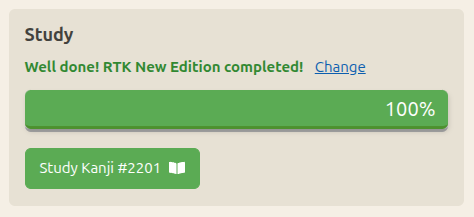
Once you add the first RTK Vol 3 kanji to your flashcards, the progress bar switches over to track RTK Vol 3 progress:
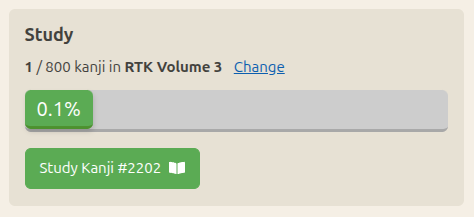
Note: because Volume 3 is just one big 800 characters lesson, I figured it wouldn´t help much to show the lesson on the dashboard so when tracking progress in Vol 3, the lesson shown below is the last one from Vol 1 ("Lesson 56 of RTK New Edition").
Old Edition has also been tested. In Old Edition you can add kanji #3008-3030 for the RTK Supplement as mentioned on the Kanji Sequence settings page. This does not cause issue, the tracking will still track Vol 1 until index #2042. Once you add kanji #2043 (old index), the progress bar switches to Vol 3, showing "1 of 965" (#2043 - #3007).
Using Claude Code
I heard about people doing some work with Claude Code on their phone so I tried it last weekend. This is a relatively small feature so I thought it would be a good test. I pulled up Claude Code with the iOS app, while I was sitting in a cafe. Told it to clone the repository and described the feature. This worked fine, although there was no easy way to navigate my code base (I noticed since the desktop web version has a file browser, but not the iOS app). I was able to review the changes in the diff. Claude created a PR. I completed this on the PC so I can properly test and write this post.
I have a Claude Pro subscription since last April. I've been hesitating for a while because I wasn't sure I would use it much, and I didn't have a lot of use cases for it yet. But then I figured I can afford it with the support on Patreon, and as a developer I need to keep up with the times. I'm actually really excited about AI. I use all 4 apps on my phone : Grok, Claude, Gemini and ChatGPT. For coding obviously it is a tremendously useful tool, although I've not had experience with "vibe" coding anything substantial so far.
Since then I used Claude Code quite a bit. It was really helpful to implement the new Patrons table you can see on the Support page. This is the kind of work AI is perfect for because it is really not rewarding as a developer to write code that hits an API to retrieve data, and honestly it would have taken me so long so scour the docs and figure out how to properly parse the XML I might have just postponed it indefinitely. But since APIs are generally well documented, AI is really good at writing that code. So I asked Claude to write me a tool that connects to the Patreon API and retrieves patron info, feed it into the database so I can display it on the page. The PHP script was then added as a job on the server which runs once a day to refresh the data.
By Month
- Oct 2026 (2)
- May 2026 (1)
- Apr 2026 (6)
- Mar 2026 (4)
- Jan 2026 (4)
- Dec 2025 (1)
- Mar 2025 (1)
- Nov 2024 (1)
- Sep 2024 (1)
- Jun 2024 (2)
- May 2024 (4)
- Apr 2024 (3)
- Mar 2024 (1)
- Feb 2024 (1)
- Dec 2023 (1)
- Nov 2023 (2)
- Oct 2023 (2)
- Apr 2023 (2)
- Mar 2023 (2)
- Feb 2023 (1)
- Jan 2023 (2)
- Dec 2022 (1)
- Nov 2022 (2)
- Oct 2022 (3)
- Sep 2022 (1)
- May 2022 (4)
- Apr 2022 (1)
- Feb 2022 (2)
- Jan 2022 (2)
- Dec 2021 (4)
- Nov 2021 (2)
- Oct 2021 (2)
- Sep 2021 (2)
- Aug 2021 (1)
- Apr 2021 (2)
- Feb 2021 (3)
- Jan 2021 (3)
- Dec 2020 (1)
- Nov 2020 (1)
- May 2020 (1)
- Apr 2020 (1)
- Jan 2020 (1)
- Oct 2019 (1)
- Sep 2019 (1)
- Aug 2019 (4)
- Jul 2019 (3)
- Jun 2019 (1)
- May 2019 (1)
- Mar 2019 (2)
- Jan 2019 (1)
- Nov 2018 (3)
- Oct 2018 (8)
- Sep 2018 (4)
- Aug 2018 (3)
- Jul 2018 (1)
- Jun 2018 (4)
- May 2018 (1)
- Apr 2018 (1)
- Mar 2018 (1)
- Jan 2018 (1)
- Dec 2017 (6)
- Nov 2017 (4)
- Oct 2017 (4)
- Sep 2017 (5)
- Aug 2017 (5)
- Jun 2017 (3)
- May 2017 (2)
- Apr 2017 (3)
- Mar 2017 (7)
- Feb 2017 (10)
- Jan 2017 (11)
- Dec 2016 (6)
- Nov 2016 (5)
- Oct 2016 (6)
- Sep 2016 (7)
- Aug 2016 (3)
- May 2016 (1)
- Mar 2016 (2)
- Jan 2016 (1)
- Dec 2015 (3)
- Nov 2015 (1)
- Oct 2015 (1)
- Sep 2015 (7)
- Jul 2015 (2)
- Jun 2015 (1)
- May 2015 (5)
- Apr 2015 (4)
- Mar 2015 (5)
- Feb 2015 (4)
- Jan 2015 (5)
- Dec 2014 (4)
- Nov 2014 (3)
- Oct 2014 (2)
- Jun 2014 (1)
- Apr 2014 (2)
- Mar 2014 (4)
- Feb 2014 (3)
- Jan 2014 (4)
- Dec 2013 (2)
- Oct 2013 (1)
- Sep 2013 (1)
- Jun 2013 (4)
- May 2013 (1)
- Mar 2013 (1)
- Jan 2013 (2)
- Oct 2012 (2)
- Aug 2012 (1)
- Jul 2012 (2)
- Jun 2012 (2)
- May 2012 (1)
- Mar 2012 (2)
- May 2011 (1)
- Apr 2011 (4)
- Mar 2011 (3)
- Feb 2011 (2)
- Jan 2011 (2)
- Dec 2010 (8)
- Nov 2010 (8)
- Oct 2010 (3)
- Sep 2010 (3)
- Aug 2010 (1)
- Jul 2010 (2)
- Jun 2010 (5)
- May 2010 (1)
- Apr 2010 (3)
- Mar 2010 (4)
- Feb 2010 (2)
- Jan 2010 (1)
- Dec 2009 (5)
- Nov 2009 (5)
- Oct 2009 (1)
- Aug 2009 (1)
- May 2009 (5)
- Apr 2009 (2)
- Mar 2009 (1)
- Feb 2009 (2)
- Jan 2009 (2)
- Nov 2008 (1)
- Oct 2008 (1)
- Sep 2008 (1)
- May 2008 (2)
- Apr 2008 (1)
- Feb 2008 (6)
- Jan 2008 (5)
- Dec 2007 (6)
- Oct 2007 (1)
- Sep 2007 (2)
- Aug 2007 (3)
- Jun 2007 (1)
- May 2007 (5)
- Apr 2007 (1)
- Mar 2007 (2)
- Feb 2007 (1)
- Jan 2007 (4)
- Dec 2006 (3)
- Aug 2006 (1)
- Jun 2006 (3)
- Apr 2006 (6)
- Mar 2006 (8)
- Feb 2006 (1)
- Jan 2006 (4)
- Nov 2005 (1)
- Oct 2005 (4)
- Sep 2005 (1)
- Aug 2005 (11)